

ShiftOS
Operating Layer That Makes Your Mac Smarter
macOS is powerful but deliberately incomplete. Windows switchers reach for keyboard shortcuts that don't exist. Power users waste time hunting for the right window. Keyboard-first users are forced to grab the mouse for two-keystroke actions. ShiftOS fixes all of that in one app, without the tab-sprawl of five separate utilities.
What's inside
Window Snap Engine
- 14 built-in snap zones — halves, thirds, 2/3 splits, quarters, maximize
- Green button popup — hover shield suppresses macOS native tiling menu; ShiftOS replica card shows all 14 zones + Full Screen with native beak style
- FancyZones — visual drag-editor for custom layouts; Dashboard + Focus presets built in; per-monitor profiles; export/import .shiftos-layout
- Snap Groups — auto-detects windows snapped together within 3 seconds; restore or delete groups from Settings
- FancyZone stacking — multiple windows per zone; cycle with keyboard; occupancy tracking
- Win+Arrow equivalent — Option+Arrow snaps; fully remappable
- Undo snap — Cmd+Z restores previous window position (20-deep undo stack)
- Windows-style Dock minimize — click Dock icon to minimize; click again to restore to last snap position
Clipboard Intelligence
- 200-item history — open with Cmd+Shift+V (Win+V equivalent)
- All content types — text, rich text, images, URLs (with favicon + title), files
- Most Used — tracks copy and paste frequency; surface your top snippets instantly
- Smart dedup — identical copies merge; copy-count badge shows how many times
- Inline Markdown rendering — bold, italic, code, links rendered in the panel
- Starred collections — organise clips into named folders
- Privacy first — per-app exclusion list (1Password, banks etc.); encryption at rest; auto-clear timer
SwitchTab — Window Switcher
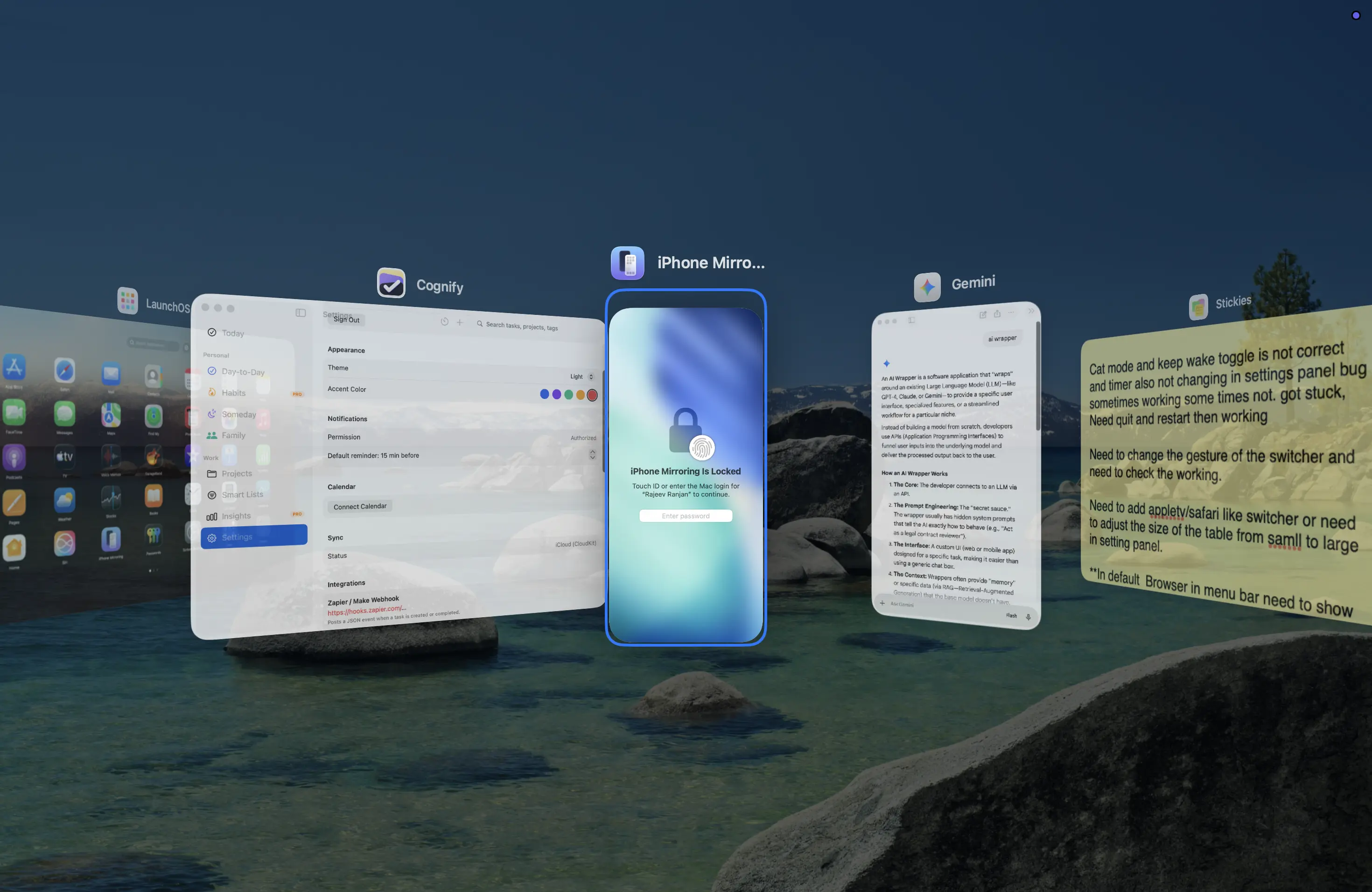
- Five view modes — Thumbnails, App Icons, Titles, 3D Tile, Aero
- Thumbnails — 340pt cards, live ScreenCaptureKit previews, 16:10 ratio, icon + title header
- 3D Tile (Pro) — iOS-style spatial card deck with real-time previews (300ms recapture loop), perspective stacking, 3-step depth setting
- Aero — Windows 7 Flip 3D replica; tilted cascading planes, spring-animated advance, cyclic deck
- Per-window — one entry per window, including minimized and every window of multi-window apps (e.g. all your Terminal tabs), MRU-ordered to match the Dock; synthetic entries for windowless apps
- Per-slot config — three independent shortcut slots each with their own view mode, Space filter, window order, and after-release action
- Blacklists — hide VMs and other apps by BundleID prefix; pre-populated with Parallels/VMware
- Live previews — ScreenCaptureKit + WindowServer fallback for minimized/occluded windows; graceful no-preview banner when Screen Recording not granted
- Action keys — W (close), M (minimize), Q (quit), H (hide), S (move to Space) while overlay is open
Finder & File Intelligence
- Native right-click → ShiftOS submenu — one branded entry holds Copy Path/Filename/URL/Markdown, New Text File, Open in Terminal, Open in New Window, Move To, Copy To, Make Symlink, AirDrop, Label Color, Advanced — all in a clean flat list
- Return key navigates in place — opening a folder with Return reuses the current Finder window instead of spawning a new one, so trackpad back/forward gestures keep working
- Shift+F10 — full menu — keyboard context menu (Windows equivalent) with arrow-key navigation and 1–9 number shortcuts; adds the actions that need system access (Git, Invert Selection, Run Shortcut) which the Finder extension sandbox can't run
- Cut and paste files — Cmd+X marks for move; Cmd+V pastes. Same muscle memory as Windows
- Git integration — status, diff, add, commit, push; Go to Repo Root; Show on GitHub
- Advanced ops — MD5/SHA-256 checksums, Make Executable, Lock/Unlock, Remove xattr, Flatten Folder
- Folder colour labels — 12 colour options persisted in iCloud Drive
Keyboard & Shortcut Intelligence
- Shortcut inspector — lists every registered global shortcut on the system
- Conflict detection + one-click rebind — detects ShiftOS vs system conflicts; suggests a free alternative; applies with one click
- Per-app profiles — different hotkey overrides per app (Video Editing, Coding, etc.)
- System toggles — Dark Mode, Grayscale, Low Power Mode, Night Shift, True Tone — all with configurable shortcuts
- Power management — Normal / Safe Sleep / Full Hibernate picker; auto-hibernate below a battery threshold
- App launch slots — 5 configurable global shortcuts to launch any app instantly
System Control
- Quick Settings — click the menu-bar icon for volume, brightness, Wi-Fi, Bluetooth, Dark Mode, Focus Mode, battery — all in one panel; tiles are user-configurable with drag-to-reorder
- Settings Search — search any macOS system preference by keyword; jump directly to it; star favourites
- OCR & QR scanner — select a screen region or use clipboard image; one-click Translate
- Keep Awake — prevent display sleep; timer (15 min / 30 min / 1 hr / 2 hr) or indefinite; a HUD toast confirms the active duration
- Auto-quit — close idle apps after a configurable timeout; protected-app list
- File Properties panel — floating panel shows size, type breakdown pie chart, and checksums; bulk multi-file mode
- Cat Mode — oversized cursor + scroll-to-zoom for presentations and low-vision use
- Settings backup — export/import all preferences as .shiftos-backup; iCloud sync across Macs
- TCC reset — reset any app's privacy permissions with one click
- Default Browser picker — optional menu-bar item; switch your system default browser in one click, no System Settings detour
Reviews
No reviews yet — be the first to share your experience.
Case Study
What ShiftOS Is
ShiftOS is a menu-bar productivity suite for macOS — six independently toggleable modules (Snap Engine, Clipboard Intelligence, SwitchTab, Finder Intelligence, Keyboard Intelligence, System Control) built to close a gap that has existed on the Mac for years: window tiling, a real clipboard history, a fast window switcher, and a keyboard-first Finder all exist natively on Windows, and all require stitching together five separate menu-bar utilities on macOS. ShiftOS is one native app instead of five, with every module able to be turned off independently if you only want one or two of them.
Who It's For
Three groups specifically: Windows switchers who lose real muscle memory the day they move to a Mac, power users who lose real time hunting for the right window across a dozen Spaces, and keyboard-first users forced to reach for the mouse for actions that should be two keystrokes.
Supported macOS Versions
macOS 13 (Ventura) and later, shipped as a Universal Binary — native on both Apple Silicon and Intel, not one architecture emulating the other.
Distribution & Pricing
ShiftOS ships dual-channel: a sandboxed Mac App Store build, and a Direct-download build with full Accessibility access and Sparkle-based auto-updates. The pricing model is a real free tier (9 snap presets, a 25-item clipboard history, basic Finder actions — no time limit, no card required) alongside paid Standard and Pro subscriptions and a Lifetime one-time purchase covering every Pro feature permanently. Purchases run through StoreKit 2. Current tier pricing is on this page's buy button, not repeated here as a static number that can drift out of date.
Technical
ShiftOS is built with SwiftUI for its interface and AppKit for the system-level control SwiftUI still doesn't fully expose — window management and Finder integration in particular. It is not an Electron app; every panel, every live preview, and every system toggle runs against Apple's own frameworks directly, not a bundled browser runtime.
Architecture & System Integrations
- Window management — Snap Engine reimplements FancyZones-style tiling (14 zones, a visual drag-editor, per-monitor profiles, a 20-deep undo stack) against macOS's own window-positioning APIs, not a private-API hack.
- Live window previews — SwitchTab's five view modes (including a 3D spatial card deck) pull live thumbnails from ScreenCaptureKit, with a WindowServer-based fallback specifically for minimized or occluded windows, which ScreenCaptureKit alone can't see.
- Finder integration — a FinderSync extension adds one consolidated right-click submenu. Because that extension runs sandboxed and can't launch processes or run AppleScript, Git actions, Invert Selection and Run Shortcut live in a separate global Shift+F10 context menu instead, handled by the non-sandboxed main app.
- Global shortcuts — the Keyboard Intelligence module reads and rebinds macOS's own registered hotkeys via the Accessibility API, with live conflict detection against shortcuts other apps already own.
- Cloud sync — Pro's clipboard sync runs on CloudKit against the user's own iCloud account, not a third-party server ShiftOS operates itself.
Performance
The heaviest real-time cost in the app is SwitchTab's 3D Tile view, which recaptures window thumbnails on a 300ms loop while the overlay is open — fast enough to feel live, infrequent enough not to keep the GPU busy when the switcher isn't on screen. Every module is independently toggleable specifically so a user who only wants, say, the clipboard manager isn't paying the CPU or permission cost of window-preview capture they never use.
Privacy & Security
- Clipboard history is stored locally with
NSFileProtectionCompleteencryption at rest, with a per-app exclusion list (password managers, banking apps) and a configurable auto-clear timer. - ShiftOS only requests the system permissions an enabled module actually needs — Accessibility for snapping/hotkeys/Finder navigation, Screen Recording for live previews, OCR and QR scanning. Turn a module off and its permission use stops.
- Pro's cloud sync goes through the user's own iCloud account via CloudKit — nothing routes through a MishoraStudio-operated server.
First-Hand Experience
Why I Built It
ShiftOS exists because the gap it fills is one I hit personally, not one a market-research spreadsheet identified. Window tiling, a real clipboard history, and a fast switcher are basic, expected productivity tools on Windows — moving to macOS meant losing all three at once, and the existing fix was installing four or five separate, unrelated menu-bar apps that didn't share settings, didn't share a design language, and each wanted their own subscription. Building one native app that does all of it properly was the more honest answer than accepting that tax.
Design Decisions
- One menu, not five. Every Finder action lives in a single native right-click submenu instead of five separate context-menu entries — the right-click menu shouldn't feel like it belongs to five different apps.
- Match the Dock, not a fixed order. SwitchTab orders windows MRU (most-recently-used), the same way the Dock itself behaves, instead of a static alphabetical list — the switcher should extend existing muscle memory, not require learning a new one.
- Fail visibly, not silently. When Screen Recording permission hasn't been granted, SwitchTab shows a clear no-preview banner instead of silently rendering blank thumbnails — permission-aware UX took more work than assuming the permission would always be there, but a silent failure is worse than an honest one.
Performance Decisions
The 300ms recapture interval on 3D Tile view is a deliberate compromise, not a default left untouched — fast enough that the preview reads as live, but not so fast that holding the switcher open becomes a measurable drain. The same reasoning drove making every module independently toggleable: performance cost should scale with what a given user actually turns on, not with everything the app is capable of doing.
Development Challenges
The two hardest problems were both about working within macOS's own sandbox rules rather than around them. First, live previews for windows ScreenCaptureKit can't see — minimized or occluded windows need the WindowServer-based fallback path instead. Second, the FinderSync extension's sandbox: it architecturally cannot launch a process or run AppleScript, which is exactly what Git actions and Run Shortcut need — solved by routing those specific actions through a separate Shift+F10 menu owned by the non-sandboxed app, rather than quietly dropping the feature.
App Store Submission & Launch
Shipping dual-channel — a sandboxed App Store build and a Direct build with full Accessibility access — was the direct consequence of what ShiftOS actually needs to do: window management and global hotkeys require system access the App Store sandbox restricts (the private Spaces API behind "Move to Space," for one, is Direct-only). Rather than quietly cutting features to fit the sandbox, or abandoning the Mac App Store's discovery and trust entirely, both distribution channels ship, each honest about what it can and can't do.
Pricing Philosophy
A meaningful free tier, real Standard/Pro subscription tiers for people who want ongoing updates, and a Lifetime purchase for people who would rather pay once and be done — offered side by side instead of forcing a single model on everyone. The free tier isn't a crippled trial; it's meant to be genuinely useful on its own, with the paid tiers unlocking depth (unlimited clipboard history with cloud sync, every SwitchTab view, usage-stats export) rather than gating basic functionality.
Lessons Learned
The recurring lesson across every module was the same one: macOS's sandboxing and permission model is not an obstacle to design around quietly, it's a constraint that should shape the feature itself. A Finder extension that can't run AppleScript isn't a bug to hide — it's a reason to build a second, honest entry point for the actions that need real system access. A missing Screen Recording permission isn't a reason to fail silently — it's a reason to say so on screen. Building for the platform's real constraints, out loud, produced a better app than trying to paper over them would have.
Related Services & Reading
Frequently Asked Questions
What is ShiftOS?
ShiftOS is a menu-bar productivity suite for macOS 13+ with six independently toggleable modules: Snap Engine, Clipboard Intelligence, SwitchTab, Finder Intelligence, Keyboard Intelligence, and System Control. Turn on only what you use.
Which macOS versions are supported?
macOS 13 (Ventura) and later, on both Apple Silicon and Intel — ShiftOS ships as a Universal Binary (arm64 + x86_64).
Is ShiftOS free?
Yes — the Free tier includes 9 snap presets, a 25-item clipboard history, Thumbnails/Icons window switching, and basic Finder actions, no time limit and no credit card required.
What's the difference between Standard, Pro, and Lifetime?
Standard ($4.99/mo) adds a 200-item searchable/pinnable clipboard, Snap Groups, 3 FancyZones layouts, and the conflict resolver. Pro ($9.99/mo) unlocks unlimited clipboard with cloud sync, unlimited FancyZones, every SwitchTab view, and usage-stats export. Lifetime ($149) is a one-time purchase for every Pro feature, forever.
Can I try Pro features before subscribing?
Yes — Settings → General → Developer includes a clearly-labeled developer/QA toggle for evaluating gated features; production purchases go through StoreKit 2.
Does ShiftOS work outside the Mac App Store?
Yes. ShiftOS ships dual-channel: a sandboxed Mac App Store build, and a Direct download build with full Accessibility access and Sparkle auto-updates.
What's the difference between the App Store and Direct versions?
The App Store build runs sandboxed, so a few system-level features (like the private Spaces API used by "Move to Space") are unavailable. The Direct build has full Accessibility access and Sparkle-based auto-updates, and supports every feature.
What is Snap Engine?
A window-tiling module with 14 snap zones (halves, thirds, quarters, two-thirds, maximize), FancyZones custom layouts, Snap Groups, and a green-button popup that replaces macOS's native tiling menu with the full zone set.
What are the default Snap Engine hotkeys?
Option+Arrow keys snap left/right/top/bottom half, Option+Cmd+Up maximizes, and Cmd+Z undoes the last snap (20-deep undo stack). Every hotkey is remappable in Settings.
What is Clipboard Intelligence?
A clipboard manager with up to 200-item history (Pro: unlimited + cloud sync), pinning, starred collections, per-app exclusions, encrypted-at-rest storage, and inline Markdown/RTF/HTML preview. Open it with Cmd+Shift+V.
Is my clipboard history private?
Yes. History is stored locally with NSFileProtectionComplete encryption at rest, you can exclude specific apps, set auto-clear timers, and Pro cloud sync uses your own iCloud account via CloudKit — nothing is sent to third-party servers.
What is SwitchTab?
A Cmd+Tab replacement with five view styles — Thumbnails, App Icons, Titles, 3D Tile, and Aero (Windows Flip-3D style) — showing one entry per window, including minimized windows, with live ScreenCaptureKit previews.
Does SwitchTab show minimized windows?
Yes — it enumerates every window per app (not just one representative window), including minimized ones, using Accessibility APIs so the switcher matches your full Dock roster.
What is Finder Intelligence?
Adds a consolidated "ShiftOS" right-click submenu in Finder (copy path/filename/URL/Markdown, symlink, move/copy, AirDrop, labels) plus a global Shift+F10 context menu that also includes Git actions and Run Shortcut outside Finder.
Why do some Finder actions only work with Shift+F10, not the right-click menu?
The native Finder right-click menu runs inside Apple's sandboxed FinderSync extension, which can't launch processes or run AppleScript. Git commands, Invert Selection, and Run Shortcut need that, so they're only available via the global Shift+F10 menu, handled by the main (non-sandboxed) app.
What is Keyboard Intelligence?
A shortcut inspector with conflict detection and one-click rebinding, usage statistics with CSV export, per-app shortcut profiles, and quick toggles for Dark Mode, Night Shift, True Tone, Grayscale, and Low Power Mode.
What is System Control?
A Quick Settings dropdown (volume, brightness, Wi-Fi, Bluetooth, Focus, battery), OCR text capture, a QR/barcode scanner, Keep Awake with timed options, Dock spacers, auto-quit for inactive apps, and settings export/import.
What permissions does ShiftOS need, and why?
Accessibility (window snapping, hotkeys, Finder navigation) and Screen Recording (live window previews in SwitchTab, OCR, QR scanning). ShiftOS only requests what each enabled module needs — turn a module off and its permission use stops.
Can I remap or disable any hotkey?
Yes — every default hotkey is remappable in Settings, with live conflict detection against other apps and suggested alternatives if a shortcut is already taken.
How do I get help or report a bug?
Use Support & Feedback in the ShiftOS menu-bar → More menu (opens a pre-addressed email), or check the FAQ and Tips pages linked from the same menu.