
By Rajeev Ranjan · 15 Apr 2026
From Idea to App Store: My 8-Week Development Process
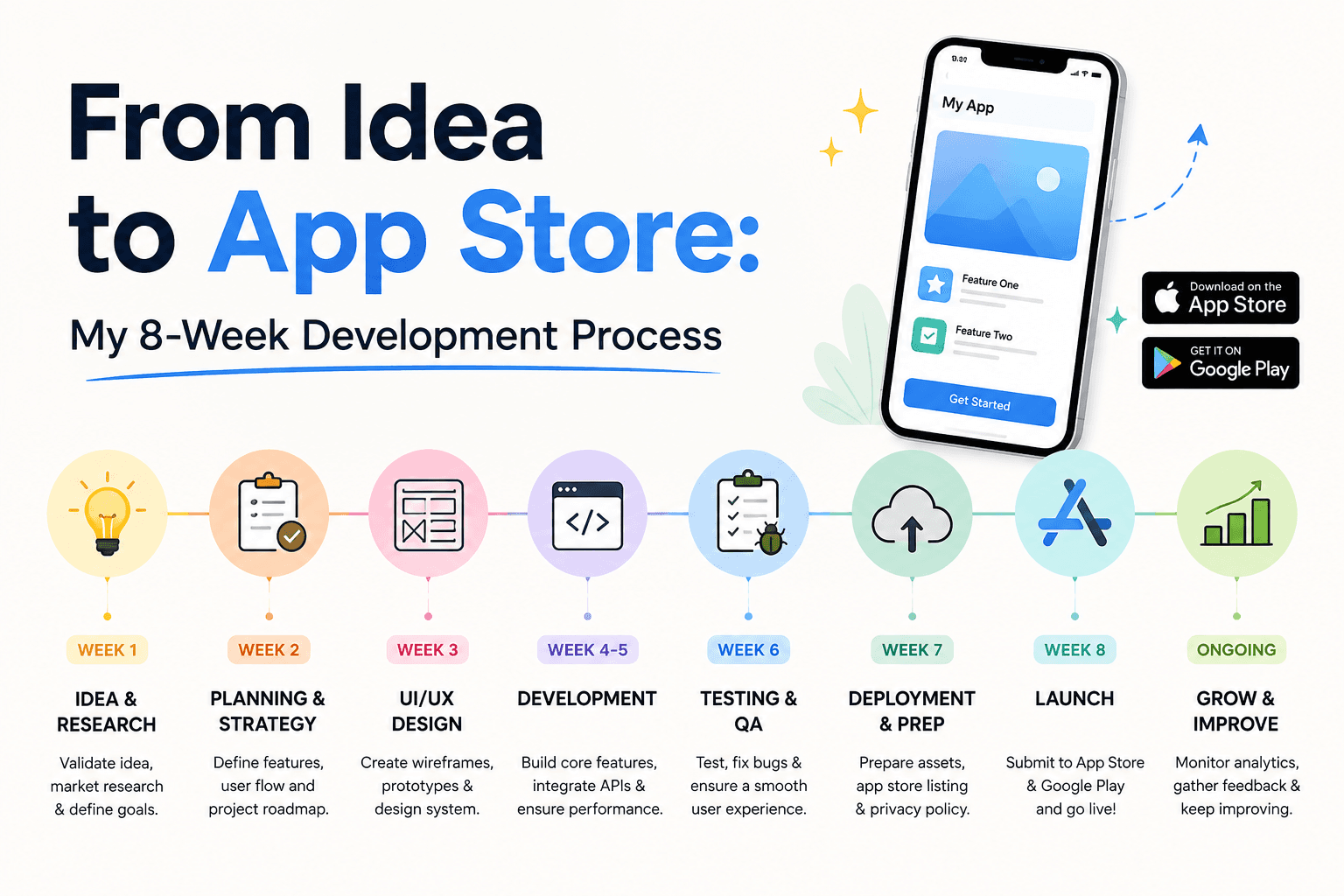
Every app I ship follows the same process. Eight weeks, from initial idea to App Store submission.
This is not a "perfect process" that exists in a slide deck. It is the actual workflow I use when I have an idea I want to ship. It has evolved through three years of shipping apps at MishoraStudio, and it is designed for one thing: shipping quality software on a predictable schedule.
Week 1: Validation
The goal of week one is not to write code. It is to decide whether the idea deserves to exist.
I answer five questions:
- What specific problem does this solve?
- Who has this problem right now?
- How are they solving it today?
- Why is my solution meaningfully better?
- What is the smallest version that proves the concept?
If I cannot answer all five clearly by Friday, the idea goes on the shelf. Most ideas should stay on the shelf. The ones worth building survive this week.
For ShiftOS, the answers were:
- macOS power users need a dozen separate utilities but want one integrated tool
- Developers, designers, writers who live in their keyboard
- Rectangle, Maccy, AltTab — separate apps, different shortcuts, no integration
- One app that combines window management, clipboard, and switching with a consistent design language
- Window snapping + clipboard history, nothing else
Week 2: Design and Architecture
With a validated concept, I move to design. Not pixel-perfect mockups — functional wireframes that define the user flow.
I use Figma for this phase, but the fidelity is low. Enough to understand:
- Screen hierarchy: what lives on each screen
- Navigation: how users move between views
- States: loading, empty, error, and success states for every screen
- Key interactions: what happens when the user clicks, drags, or types
Simultaneously, I define the architecture:
- What data model do I need?
- Where does data persist?
- What external services (if any) does the app connect to?
- What are the core Swift types?
By the end of week two, I have a blueprint. I know exactly what I will build in weeks three through six.
Weeks 3-4: Core Features
These two weeks are heads-down building. No distractions. No feature creep.
I build in order of risk:
- The data model and persistence layer first. If the data architecture is wrong, everything built on top is wrong.
- The primary user flow. The "happy path" from launch to completing the core task.
- The secondary screens. Settings, preferences, about panels.
Two rules during this phase:
- No custom UI. Use system components. You can polish later. Right now, prove the flow works.
- No premature optimization. UserDefaults is fine. Serializing JSON to a file is fine. You can migrate later when you have users to justify the optimization.
Week 5: Polish and Edge Cases
Week five is where the app becomes an app, not a prototype.
I go through every screen and fix:
- Spacing, alignment, and typography
- Animation timing and easing curves
- Loading, empty, and error states
- Keyboard navigation and accessibility
- Dark mode support
This week is also for edge cases:
- What happens if the user denies a permission?
- What happens if the network is unavailable?
- What happens if the user has 10,000 clipboard entries?
- What happens on the oldest supported OS version?
Week 6: Testing
I test on real devices. The simulator is useful for development. Real devices catch real issues.
My testing checklist:
- Install on three devices (different OS versions)
- Use the app normally for a full day
- Try to break it: rapidly click buttons, enter invalid data, toggle settings while an operation is running
- Run the app with Instruments (time profiler, leaks, memory)
- Test the uninstall and reinstall flow
- Test the upgrade path (install old version, install new version)
If I find a crash or a data-loss bug, everything stops until it is fixed.
Week 7: App Store Assets
Week seven is nondeterministic because it depends on waiting for other people.
I prepare:
- App Store screenshots (6 per device family)
- App icon (all required sizes)
- App description and keyword list
- Privacy policy (if needed)
- Marketing site updates (if needed)
I submit to TestFlight and send invites to 5-10 beta testers. Their feedback usually catches 2-3 things I missed.
Week 8: Submission
The final week is about making sure the submission goes smoothly.
I verify:
- All required screenshots are uploaded and in the correct order
- The build passes App Store validation
- I have answered all the export compliance questions accurately
- The in-app purchase products (if any) are configured
- The app's age rating is correct
I submit on a Monday morning. Apple usually responds within 24-48 hours for initial review. If there is a rejection, I fix it and resubmit the same day.
What This Process Does Not Include
- Marketing preparation: I start that before week one. By week eight, I should have been posting about the app for weeks.
- Post-launch features: The v1.0 ships with the scope defined in week one. Everything else is v1.1.
- Perfection: Week one decides what is good enough. Week eight ships it.
Why This Process Works
Eight weeks is short enough to maintain momentum and long enough to build something real. A shorter timeline encourages corners that come back as technical debt. A longer timeline encourages feature creep and burnout.
Every app I have shipped on this schedule has gone to production on time. Every app I have shipped without this schedule has slipped by at least two weeks.
The discipline is not the process itself. It is saying no to everything that does not fit the eight-week window.
Keep Reading
Rajeev Ranjan
Independent developer behind MishoraStudio, building native iOS, macOS, and Android apps from Ahmedabad, India. Maker of ShiftOS. Writes from real shipped-app experience, not generic tutorials.